September 14, 2026 / UX and Accessibility
Xbox Design Lab: how Microsoft’s custom controller program works
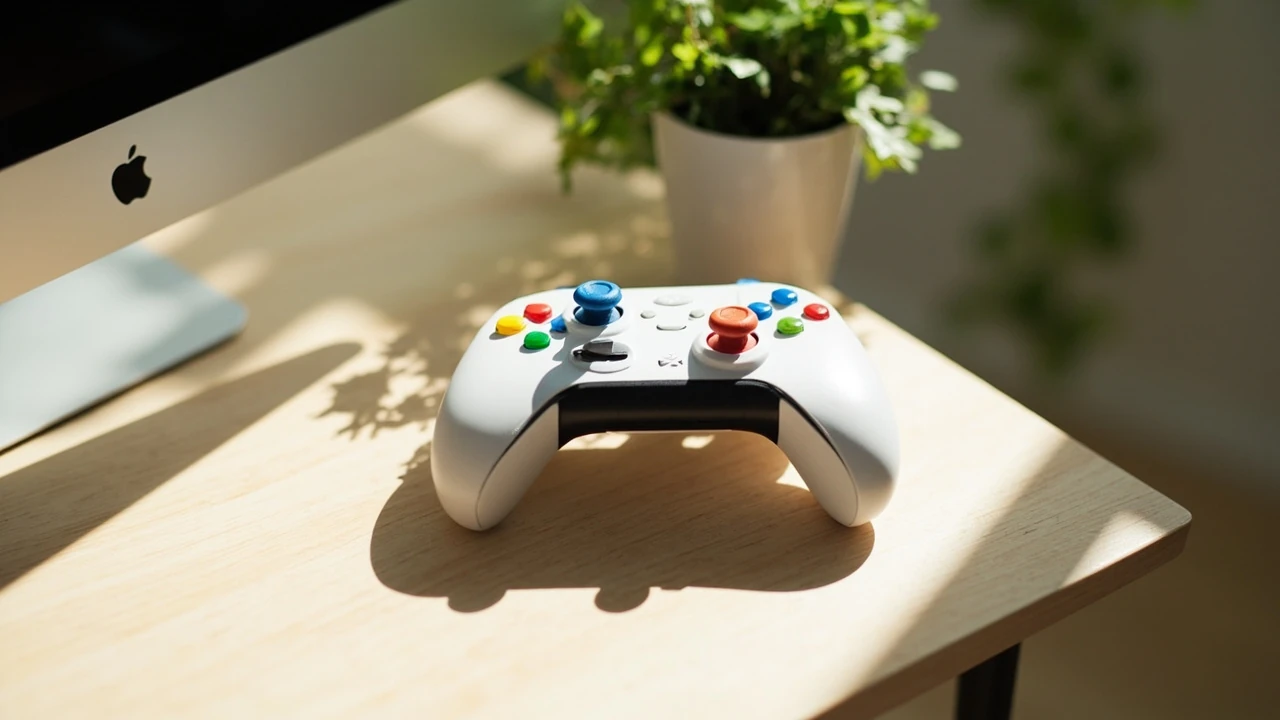
A first-time visitor to the Xbox Design Lab page usually arrives with one practical question: can I actually build the controller I want, and what does it cost? The program lets a buyer customize the shell, thumbsticks, triggers, D-pad, back buttons, and engraving of a stock Xbox Wireless Controller, then ships a finished unit. The catch is that the catalog, region availability, and base model rotate, so the value of the page depends on knowing what is currently offered and how each choice affects the final price.
This guide explains how Xbox Design Lab works as a product, how the configurator is built, and how a buyer should evaluate whether the custom path is worth the premium over a stock controller. It also looks at the design decisions Microsoft has made for accessibility, the limits of the program, and what changed when Microsoft retired the original Xbox One controller version and moved to the current Xbox Wireless Controller base.
Xbox Design Lab at a glance
Xbox Design Lab is Microsoft’s online configurator for personalizing a wireless Xbox controller. The product started as an Xbox One project in 2016, paused in 2020, and returned in 2023 on a new base controller. Buyers choose colors for each part, optionally add a custom engraving, and the controller is assembled and shipped from Microsoft’s hardware partner.
What makes the program interesting from a design and product perspective is not just the color palette. It is the constraint system Microsoft uses to keep the catalog small enough to manufacture while still offering a wide visual range. A useful way to read the program is as a study in mass customization: a finite library of parts and finishes, combined in millions of permutations, sold direct to consumer.
How the Xbox Design Lab configurator is structured
The configurator mirrors the physical anatomy of the controller. Each component that has a visible surface is a separate color choice, and each choice is drawn from a fixed palette published on the product page. Microsoft does not let buyers upload images, gradient artwork, or custom textures; every visual decision is constrained to a small number of approved finishes.
Behind the scenes, this turns the page into a parts picker rather than a free-form design tool. The design intent is closer to choosing a car trim than designing a car: every option is real, every option is buildable, and the catalog page is the single source of truth for what is currently in production.
The parts you can change
- Top case (front shell): the main face plate around the thumbsticks, D-pad, and ABXY buttons.
- Back case: the rear shell and battery cover area.
- Bumpers and triggers: the LB, RB, LT, and RT pieces, which are color-independent of the main shell.
- Thumbsticks: the two analog sticks and their bases, in a small set of accent colors.
- D-pad: the directional pad piece, treated as a separate color choice.
- ABXY buttons: the four face buttons, available in several solid colors.
- Engraving: up to a short string of text on the back, with a font preview shown live.
Some versions of the program have included an Elite-style option, such as swappable stick tops or paddle back buttons. The current Xbox Design Lab program uses the standard Xbox Wireless Controller as the base, not the Xbox Elite Wireless Controller Series 2, so the paddle and stick-swap features of the Elite line are not part of the configurator.
The parts you cannot change
- Internal hardware, including the haptic motors, the Bluetooth radio, the battery, and the thumbstick modules themselves.
- Button layout, which remains the standard Xbox asymmetric stick layout.
- Connectivity, which is the standard Xbox Wireless and Bluetooth pairing used by the stock controller.
- Trigger type, which is the standard impulse trigger and not the hair-trigger lock found on the Elite controller.
This is the line between cosmetic customization and product customization. The Xbox Design Lab controller plays identically to the stock version because the only variable Microsoft ships is the color of the molded parts and the laser-etched text on the back.
Pricing, shipping, and where the controller ships from
Two numbers matter: the base price of the custom controller and the shipping cost. The base price is higher than a standard Xbox Wireless Controller because each unit is built to order. Shipping is set per order, not per item, and the program is direct from Microsoft’s manufacturing partner rather than a retail channel.
There is no per-part upcharge in the current configurator. Buyers do not pay more for an unusual color combination or a longer engraving. The price is the same whether the controller is all-black with a small name tag or a high-contrast multi-color build with the maximum character count. This is one of the design decisions worth understanding: the program does not punish buyers for picking loud combinations.
| Cost element | How it works on Xbox Design Lab | Compared with a stock controller |
|---|---|---|
| Base unit price | Single fixed price for the custom controller, independent of color choices | Higher than the standard Xbox Wireless Controller |
| Engraving | Included up to the character limit, no extra fee | Not available on stock retail controllers |
| Shipping | Set per order, calculated at checkout by region and speed | Often free or faster through standard retail channels |
| Returns | Custom controllers are personalized items, so return conditions are different from a stock controller | Stock controllers follow standard retail return policy |
| Warranty | Standard Microsoft controller warranty applies to the assembled unit | Same standard warranty |
For shoppers in regions where the program is not sold, the configurator simply does not show a buy option. The page instead shows the gallery and explains that the service is not available in the buyer’s market. This is a deliberate decision: Microsoft does not ship finished custom units across every region, so the configurator is region-locked rather than region-pricing.
Design choices Microsoft made for the current program
The original Xbox Design Lab launched with a much larger palette, including metallic and rubberized finishes. When the program returned in 2023, the catalog was reduced. Two design priorities explain the cut: factory cycle time and visual consistency.
Mass customization works when the number of unique part SKUs is small enough for the assembly line to handle without slowing down. A controller with seven colored parts and a deep palette can produce thousands of valid combinations. A tighter palette keeps that combinatorial space under control. From a manufacturing standpoint, this is the same logic that pushes automotive configurators toward curated “design packs” rather than per-panel color selection.
The second priority is visual consistency. The 2023 palette is built around a small set of base colors and a smaller set of accent colors. Each combination is pre-checked so the controller does not ship with a face plate and back case that look mismatched under retail lighting. This is one reason the gallery on the Xbox Design Lab page shows full builds rather than per-part swatches: the gallery is meant to teach buyers what a finished unit looks like, not what each isolated part looks like.
Why the controller base changed
Microsoft retired the original Xbox One base when the program paused in 2020. When the program returned, it moved to the current Xbox Wireless Controller. The reason is straightforward: the company stopped producing the older shell, and keeping a separate mold line alive purely for a direct-to-consumer custom program was not economical. Reusing the current production controller base means Xbox Design Lab benefits from any internal hardware improvements the standard controller receives, including the share button and the updated d-pad shape introduced in recent revisions.
For buyers, this means the internal electronics, weight, and feel of an Xbox Design Lab controller match the standard controller of the same generation, with no functional compromise. The trade-off is that features introduced on the Xbox Elite line, such as adjustable stick tension or hair-trigger locks, are not part of the build.
Accessibility features visible in the configurator
One of the more interesting design decisions in the current Xbox Design Lab program is that it explicitly carries over the Xbox Adaptive Controller language: a high-contrast color choice is a first-class option rather than a special request. The catalog includes bright accent colors that make individual parts easy to tell apart at a glance, which matters for players who use the controller in low light, with limited vision, or with a non-standard grip.
Accessibility on a custom controller is not just about the hardware; it is also about how the build is presented. The configurator shows the controller from multiple angles so a buyer can see the back engraving, the trigger colors, and the thumbstick base without guessing. For a player with reduced mobility, the engraving can also act as an identifier if the controller is shared in a household, school, or care facility, which is one of the small but practical reasons the engraving field exists at all.
It is worth being clear about the limits. The Xbox Design Lab does not change the layout, button size, or trigger resistance. Players who need the larger buttons, the programmable ports, or the co-pilot jack of the Xbox Adaptive Controller still need the dedicated adaptive hardware. The Design Lab is a way to make the standard controller more visible and more personal, not a substitute for accessibility-targeted hardware.
How to evaluate whether Xbox Design Lab is worth it
Three practical questions usually decide whether a buyer should order from Xbox Design Lab or buy a standard controller. The first is whether the buyer actually wants a specific color combination that is not available in retail. The second is whether the buyer is willing to wait for the build-to-order lead time. The third is whether the buyer can use the engraving, which is the part of the program that has no retail equivalent.
| Decision factor | Choose Xbox Design Lab | Choose a stock controller |
|---|---|---|
| Color priority | You want a specific multi-color combination the retail line does not sell | You are happy with the standard colorways Microsoft already ships |
| Engraving | You want a name, gamertag, or short text on the back | You do not need any custom text |
| Lead time | You can wait for build and ship times measured in weeks | You want next-day pickup from a retail store |
| Price ceiling | You are willing to pay the custom premium over a stock unit | You want the lowest possible price for a working Xbox controller |
| Resale | You plan to keep the controller rather than resell it | You may want to resell or gift the controller later |
For a buyer who answers yes to the first two and is comfortable with the third, the program delivers something the retail channel cannot. For a buyer who answers no to the first two, the premium is paying for a custom service the buyer will not actually use.
Practical checks before placing an order
The configurator is mostly a visual exercise, but a few details are easy to miss and worth verifying before the order is placed.
- Region availability. Confirm the buy button is visible at the end of the configurator. If the page is in gallery mode only, the program is not sold in the buyer’s market.
- Engraving content. Check spelling, capitalization, and spacing. Engraved controllers are personalized items, and the program documents that returns on these units follow a different policy from stock controllers.
- Color under real lighting. Use the gallery, not just the configurator, to see how the chosen combination looks on a finished unit. The configurator previews are accurate but flatter than a real photograph.
- Controller generation. Make sure the base controller shown in the configurator is the version compatible with the buyer’s console and the buyer’s expectations, since internal hardware matches the standard controller of the same generation.
- Lead time. Build and ship windows are listed before checkout. Factor in any planned trip, gift date, or tournament before placing the order.
These checks are not a workaround for a buggy tool. The configurator is reliable; the issue is that custom controllers are by definition one-off, so a small mistake in the order is harder to correct than a mistake in a stock order.
How Xbox Design Lab compares with similar programs
Other console makers have run similar custom controller services. The most useful comparison is with Sony’s DualSense customization program for the PlayStation 5, which has at times offered front-shell and back-shell color choices and small engraving. Nintendo has historically avoided a direct custom program for Switch controllers, leaving third parties such as Hori to fill the gap with licensed and unlicensed alternatives.
| Program | Platform | Customization depth | Engraving | Typical lead time |
|---|---|---|---|---|
| Xbox Design Lab | Xbox Wireless Controller (current generation) | Multiple parts, fixed palette, multi-color builds | Yes, on the back of the controller | Build-to-order, several weeks |
| Sony DualSense custom program | PlayStation 5 DualSense | Front and back shell color, accent parts, limited palette | Sometimes, depends on the current offer | Build-to-order, several weeks |
| Third-party custom shops | Varies, often unofficial shells and buttons | Wide, including shells, buttons, and thumbstick tops | Sometimes offered by the shop | Depends on the shop, often faster |
The honest comparison is that each path has a different risk profile. First-party programs are slower but ship a controller that still carries the manufacturer’s warranty. Third-party shells and buttons can look more aggressive or more personal but require the buyer to disassemble the controller and accept that the warranty treatment for shell swaps varies by region.
What changed since the program returned in 2026
The 2023 relaunch was not a straight revival of the 2016 program. The catalog shrank, the base controller changed, and the configurator was rebuilt around the current Xbox Wireless Controller. The gallery was expanded to highlight community submissions, which doubled as a way to show buyers what a finished unit looks like in a real room rather than on a flat swatch.
Microsoft has also used the program as a marketing surface for limited-time palettes tied to specific launches. These temporary palettes do not change the base price or the warranty, but they do change the catalog that is available at any given moment. A buyer who sees a particular combination and waits a few weeks may find that the temporary palette has rotated out, so the safe approach is to finish the configurator and check out in the same session if the combination matters.
Internal references for design and product readers
For readers who want to read the Xbox Design Lab program as a case study rather than a shopping page, two related articles on this site cover the same ground from a design and strategy perspective. The piece on visual identity explains how a constrained palette is often a stronger brand signal than a free-form tool, which is the same logic behind the trimmed catalog in 2023. The piece on web accessibility is a useful companion because the configurator itself is a product interface, and the way it handles color, engraving, and region gating is a small accessibility story of its own.
Frequently asked questions
Is Xbox Design Lab still available in 2026?
Yes. Microsoft has kept the program live on the current Xbox Wireless Controller base since the 2023 relaunch. The configurator is region-locked, so the buy button is only visible in markets where the build-to-order service is sold. The gallery and inspiration pages are usually visible in all regions.
Can I upload my own image or artwork to Xbox Design Lab?
No. The program only supports color choices from the published palette and a short text engraving on the back. There is no image upload, no gradient tool, and no way to submit a custom texture. This is a deliberate constraint that keeps the catalog buildable on a real assembly line.
How long does an Xbox Design Lab order take to ship?
Build and ship windows are listed in the configurator before checkout and are measured in weeks rather than days. The exact window depends on the buyer’s region and the current production load, so the safe approach is to check the live estimate in the configurator before placing the order.
Does the Xbox Design Lab controller include the Elite features?
No. The current program uses the standard Xbox Wireless Controller as the base, not the Xbox Elite Wireless Controller. Adjustable stick tension, hair-trigger locks, swappable thumbstick shapes, and the rear paddle buttons of the Elite line are not part of the build, even on a fully customized unit.
Can I return an Xbox Design Lab controller?
Custom controllers are personalized items, and Microsoft’s published return terms for personalized products differ from the terms for a stock controller. Before placing an order, the buyer should read the current return policy shown in the configurator and in the cart, and confirm the engraving text and the color choices in the order summary.
Is there an extra charge for the engraving?
No. Engraving is included up to the character limit shown in the configurator, and there is no per-part upcharge for color choices. The price of a custom controller is the same whether the buyer picks a high-contrast multi-color build or a single-color build with a long engraving.
Does the Xbox Design Lab controller work on PC?
Yes. The internal hardware is the same as the standard Xbox Wireless Controller, including the Bluetooth radio and the Xbox Wireless protocol. A custom-built controller pairs with a Windows PC the same way a stock controller does, with no driver or firmware changes required.
Why is the base price higher than a standard controller?
Each Xbox Design Lab controller is assembled to order, and the build process, the engraving step, and the direct shipping from the manufacturing partner all add cost. The premium reflects the build-to-order service rather than any internal hardware upgrade over the standard controller.
Can I see my Xbox Design Lab controller before I buy it?
The configurator includes a live preview that updates as each part is changed, and the product page also shows a gallery of finished community builds. The gallery is the most realistic view because the photos are taken in real lighting, while the configurator preview is a clean render.
What happens if Microsoft retires the program again?
If Microsoft retires Xbox Design Lab, the existing warranty on controllers already shipped continues to apply. The configurator and the order page would be taken offline, so any unfinished configurations would be lost. A buyer who is close to placing an order should finish the checkout in the same session rather than leaving the configuration parked in a cart.